
I was deep into a refactor when the text came: "Let me know when you're here - Isaac." I'd misremembered the time. His goodbye drinks were now. I scrambled to tie up loose ends, find the address, and get out the door. I arrived late and flustered, never properly wishing my friend good luck on his new adventure.
This happens to me too often. I've never kept my schedule up to date even though I stress when making new plans: Am I forgetting about a conflict? Did my partner already make plans? And I sometimes miss details, like picking my mom up an hour late because I remembered the wrong landing time.
The problem isn't wanting an up-to-date calendar—it's that translating casual texts into structured calendar entries is tedious enough that I always put it off. So I built an autoscheduler that does the tedious part for me: it reads my texts, extracts plans using Gemini, and updates my calendar automatically.
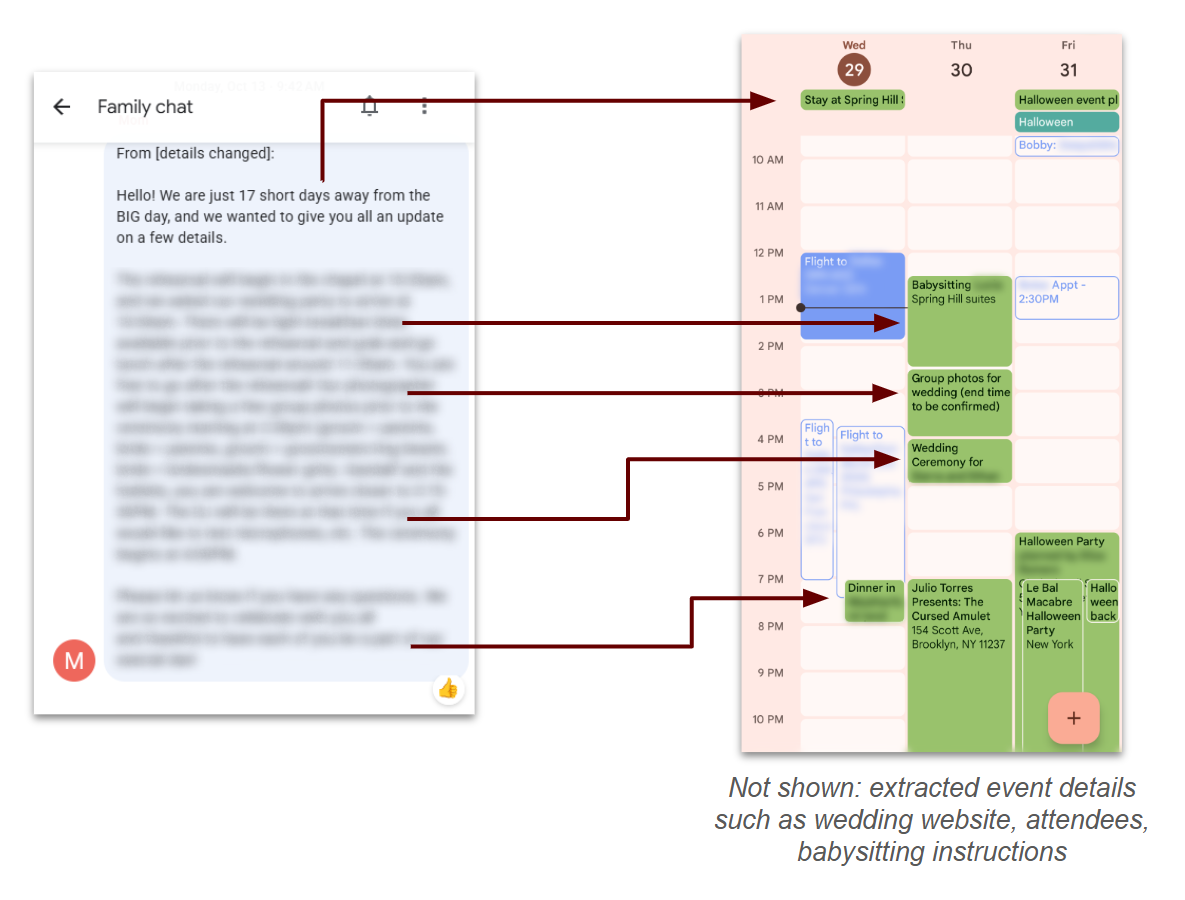
Diagram of autoscheduler extracting events from a giant text
Autoscheduler in practice
The autoscheduler works by taking any message I receive that has plans, ex: "let's shoot for tomorrow night for games. Also hosting a movie night in the theater room on Friday! Leaning towards the new knives out movie" and putting the event, along with any details I might care about onto my calendar.
In a typical week, this looks like: 3-4 events added to my calendar that I hadn't added manually and additional details for 1-2 existing events such as adding a link to the hotel my partner and I are staying at to the ski trip I already had on the calendar.
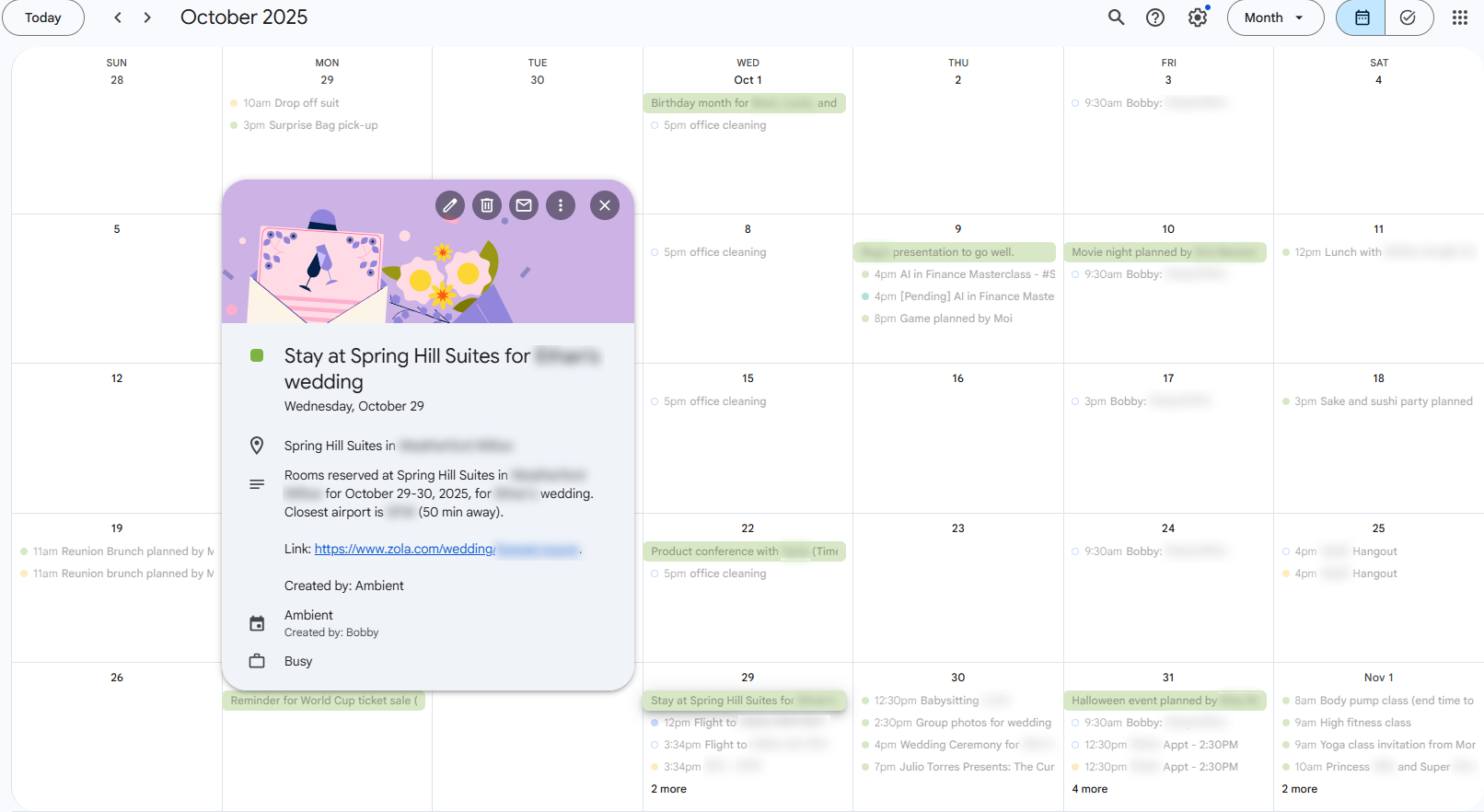
Green events are from autoscheduler, 4-5 events per week with details like location, referenced links, and more
Custom data extraction - An emerging LLM capability
While this may seem simple — Google has been doing this for years with flight information (incidentally one of my favorite features) – the technology to enable without ~months of a full ML team reached an inflection point ~mid 2025. The problem is that, unlike flight information, people don't text in structured data:
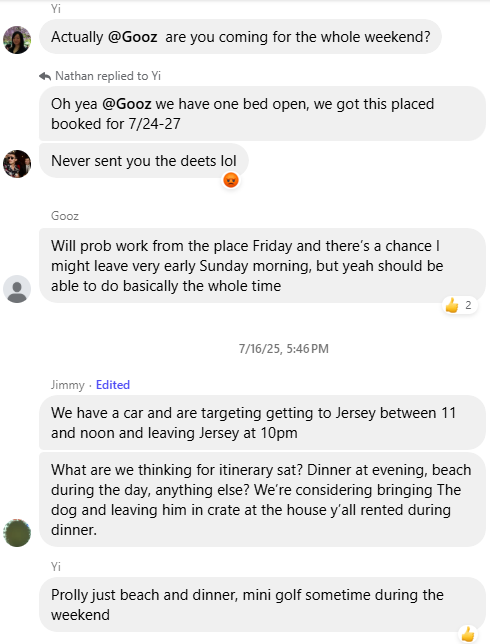
Complicated texts, though this may actually be the most organized that group chat ever was
In this conversation: Jimmy only ever implied which day he was coming. Who does "we" mean? Gooz said yes, but then says he's coming Friday which is actually mid-trip (7/24 is a Thursday) and then may leave early? TBD?
There's a lot that most people would find hard to figure out, much less an AI:
- Temporal ambiguity: "The weekend" means the weekend of the trip, not the coming weekend which it typically means
- Typos: "This placed" almost certainly means "this place" given the context.
- Implicit information: "This placed" likely refers to a hotel or airbnb somewhere upthread that needs to be retrieved based solely on contextual understanding of what is meant.
- Multiple, unclear dates: Gooz says yes to all the dates but actually meant just Friday-Sunday
- Scattered details: Events and times come from different people across multiple messages
And that's just the AI part. You also need to get the texts in real time, display the structured events and more. Let's dig in.
System Architecture
The autoscheduler has three core components: message access, event extraction, and calendar sync.
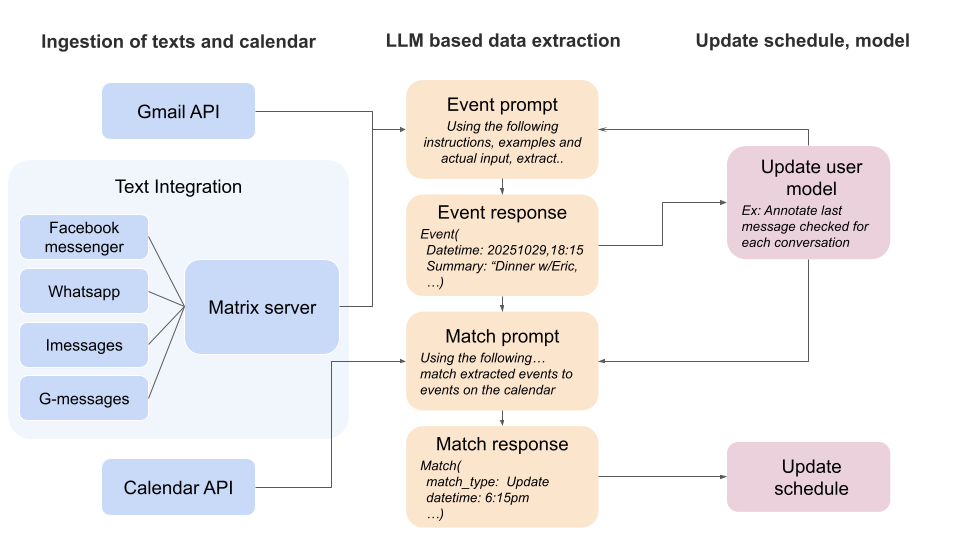
Autoscheduler system diagram
1. Getting Access to Messages
The system supports two input methods:
Platform integration: Users authorize/provide access to a messaging platform (WhatsApp, iMessage, etc.). This provides access to historical messages for context and doesn't require creating a bunch of new group chats.
Directly texting the autoscheduler: Add the autoscheduler's number to group chats. This limits data shared with the autoscheduler and enables direct queries like "@Ambient when do I fly to Texas?" but requires remembering to add it to conversations and doesn’t work for most platforms as they prohibit automated texting of any kind (whatsapp, facebook messenger etc).
Platform integration
For the integration approach, I use a Mautrix-based stack: Mautrix bridges → Matrix Synapse server → matrix-nio client. This stack is open-source, proven (powers Element and Beeper), and more resource-efficient than building from scratch.
The main limitations I've hit:
- Some bridges don't backfill beyond ~100 messages
- Message timestamps occasionally need correction
- Conversation metadata requires additional storage outside the stack
2. Information Extraction: The Interesting Part
With the data in hand, it's time to make it structured and useful. This is where LLMs have significantly expanded what is possible. In 2022, state-of-the-art NLP could barely extract names and relationships from text. By early 2024, you needed fine-tuning and thousands of examples. With GPT-5-class models, it's possible to extract rich custom objectsin ~days.
Event extraction: conversation data and instructions go in, structured events come out
The final process is:
- Filter to conversations that might have new information
- Send each conversation to Gemini with specific instructions/examples for extracting event information
- Match event info to the calendar to avoid dupes and detect when information is an update or a new event
- Update the user's schedule and underlying user model (e.x: track which messages have been checked)
Each instruction set is ~8 paragraphs so I won't share the entirety of them here. Their general structure is:
- Problem summary: Your job is to extract event information from text messages.
- Key context: The user's name in the conversation is [x], etc. Note: I didn't find it necessary to state the current date but the messages all had timestamps anyways
- Instructions: Start with the initial flow (read the texts, if events are being discussed, annotate their details). Then 2-3 paragraphs of what reading texts means, how to annotate details, etc)
- Description of the different data objects: Messages will look like [{'date':[the date the message was sent]...}, {...}, …]
- Fewshot examples: A few examples of the exact input and desired output object. This makes the prompt 2-3x longer but brought the accuracy of Gemini 2.5 models from ~80% to 95%. There were 2-3 cases where improving instructions was unable to fix an edge case but adding an example was (examples were intentionally different enough for this to not be memorization). Only one example of each type of annotation (i.e: an example with a location annotation) was needed.
Key Technical Learnings
LLMs struggle with custom objects: I found that asking the model to update an existing Event object was 70% less accurate than regenerating the entire event from the original + new messages. The model handles "here's a conversation, extract events" much better than "here's an event object, here's new information, produce an update."
Effort quotas are real: Even without hitting token limits, models have something like an "effort budget." When I asked the model to extract events AND cite the specific messages each detail came from, overall accuracy dropped 50%. I now do extraction and citation as separate passes.
Using a structured outputs API has a lot of caveats: In July 2025, it was necessary to use Gemini's mime/type params to get parseable JSON from 2.5-lite. This raised the number of parseable objects returned from ~60% to ~95%+. Frustratingly this did not ever get to 100% even with the strict requirements. A couple of other important things to note:
- JSON parseability changed day to day despite being on a "stable" model. There were some days where without changing anything parseability accuracy would drop back to 60%. This hasn't been a problem with Gemini 3 but I also switched to using Pro after 2-3 instances of Lite's accuracy randomly dropping for days.
- Providing the specific JSON schema never increased accuracy and instead broke things. This is likely because the model seems very strict about datatypes with fields that can be Nones. When told to return either str or none, If it cannot return an str it drops not only the field, but often the parent object as well. For example: The event object has a date subobject with fields for start, end etc. When I didn’t document the fields and just called it a generic object, the model would correctly annotate the present fields and leave not present fields blank. When I added start, end, etc as fields in the schema, if the model couldnt figure out an end time it would drop the whole date subobject.
- Other developers have found it better to not use MIME types at all. It likely varies by use case and the model's ability to consistently output parseable JSON without the MIME types. I haven't tested this on the latest models so can't say for sure.
This is quickly becoming economical. The autoscheduler is currently expensive to run as a free service – it’s ~$50 per year to process the ~1 million tokens of texts the average user generates per year (based on current alpha testers) along with the instructions, re-processing to update events, etc – but costs are quickly dropping. Flash lite will likely reach usable levels of accuracy in the next year dropping costs ~10x to ~$5 a year and its likely further optimization (e.x: instruction caching) could further reduce costs.

Credit: https://verdik.substack.com/p/how-to-get-consistent-classification
What doesn't work (yet)
Even with all the above, matching events from texts against a user’s calendar still often misses a match leading to duplicates with slightly different information. It’s likely that comparing field values across custom objects is not very similar to most text comprehension tasks – I.e: Turning “next friday” into “Friday, Jan 15” is similar to many reading/writing tasks that llms are trained on. Accessing the summary field for two objects is less common, requires more steps– and there’s a nested extraction step – To determine that a text chain that says “lets meet friday” -> “actually saturday” should match a friday object and then change it to saturday actually involves extracting a friday event.
I haven’t come up with a great solution for this, likely as models improve I’ll move simpler extraction to lower intelligence models but keep tasks like these on top models. Fortunately the current ~90% accuracy is high enough for the product to work and the failure case is too many events which is better than missing one.
3. Calendar Integration
Google Calendar works excellently for displaying the schedule: it's where most users already manage their schedules, has a solid API, and the UI handles event display well. New events go to a dedicated "Autoscheduler" calendar so they're visually distinct and easy to override if wrong.
To authorize access to calendar and contacts, Google provides an API to request different access levels which they call scopes. To match a phone number to a name (only needed for direct chat, the full integrations already have this) I get the contacts scope. To match a name to an email (there’s a button to invite other people in the conversation to the generated event), I use Google Contacts' contacts.other scope. Finally the calendar scope is needed to update the calendar. Somewhat surprisingly these scopes work for most iPhone users, almost all my alpha testers on iPhones stored their contacts in Google Contacts.
Try It / Build Your Own
If you want to try the autoscheduler, there's a trial version at tryambientai.com that let's you test a couple of interesting AI + text features with set autodeletion of messages. Signups are limited to the first ~100 to constrain costs.
If you want to build your own, hopefully this gives you a good overview and I'd love to hear what you build.
What's Next
The autoscheduler solves my calendar problem, but there's so much more buried in texts that could be improved:
- Task extraction - Can you pick up milk?
- Better searching - What is Nathan's address
- Custom analysis/advice - What should I get my mom for christmas
Some of this is done but not written up, some is yet to come. If there's a specific part you're interested in, let me know.